Documents & stories
Upload what you already know. Correctest checks it two ways.
Crawling the live app is one way Correctest learns it. The second is reading the documents your team already has. Correctest doesn't need them to start; the crawl maps your app on its own. But give it your stories and rules and two things happen: your documents corroborate each other the moment they land, and, once you scan, they are checked against what your app actually does.
Formats and channels
The formats real teams actually have.
Markdown, plain text, Gherkin .feature files, CSV, Excel, Word and text-based PDF. A CSV, or each sheet of a workbook, becomes one document per row, so a data dictionary's rows each become their own fact with the sheet and row kept for provenance. A Word document is read as linear text. A scanned, image-only PDF has no text layer, so Correctest asks for a text version rather than guessing.
Length is not a limit. A long data dictionary or a detailed analyst-written story is read in full rather than truncated to fit, so the document channel does not quietly depend on your documents being short.
Two dials describe each document.
What it is: a user story, business rules, a data dictionary, an API spec, an epic, an architecture note, a persona definition, a glossary, a compliance note, or "other". How it should be used, which is the important one:
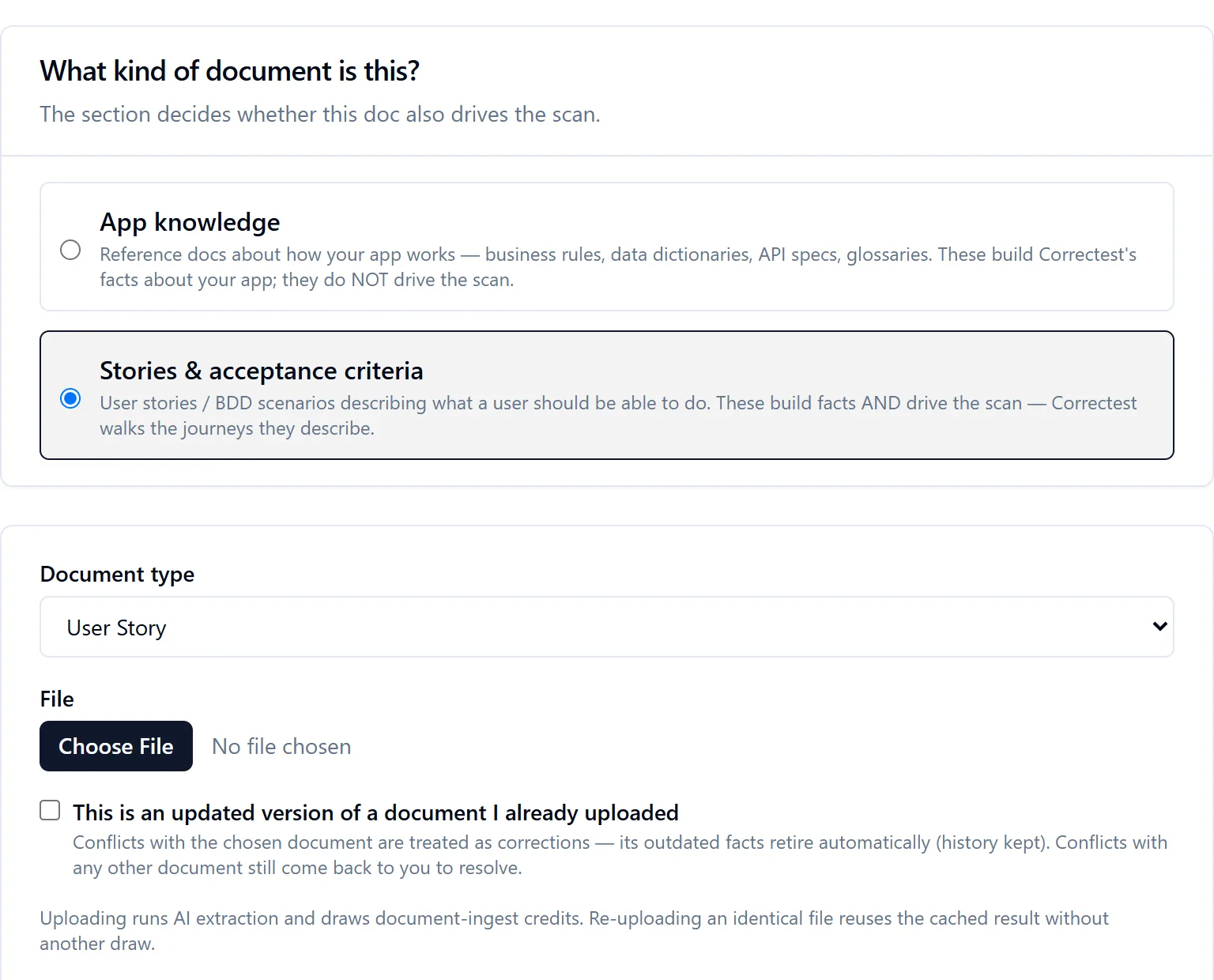
- App knowledge: the document only contributes facts. It teaches Correctest; it never triggers scanning.
- Stories & acceptance criteria: the document contributes facts and drives the scan. Correctest walks the journeys it describes.
The channel, not the contents, decides. If you deliberately upload a story document as knowledge, Correctest respects that and won't try to execute it. A file re-uploaded under the other channel is kept once and routed additionally, never duplicated or re-charged.
A document is not a scan
Ingesting a document does not create a scan. Its AI work is metered on its own, re-uploading an identical file reuses the cached result without another draw, and each extracted fact is tied to its source document. Facts live at the application level: one body of knowledge that informs every future scan of that app.
A fact is never an assertion on its own
"A coupon code must be at most 100" or "shipping is free over $50" is recorded as context that informs judgement later. Correctest never turns a document claim into a pass/fail assertion by itself. Learn, don't judge, applied to documents.
What an upload does
Every upload ends on a result page, not in silence.
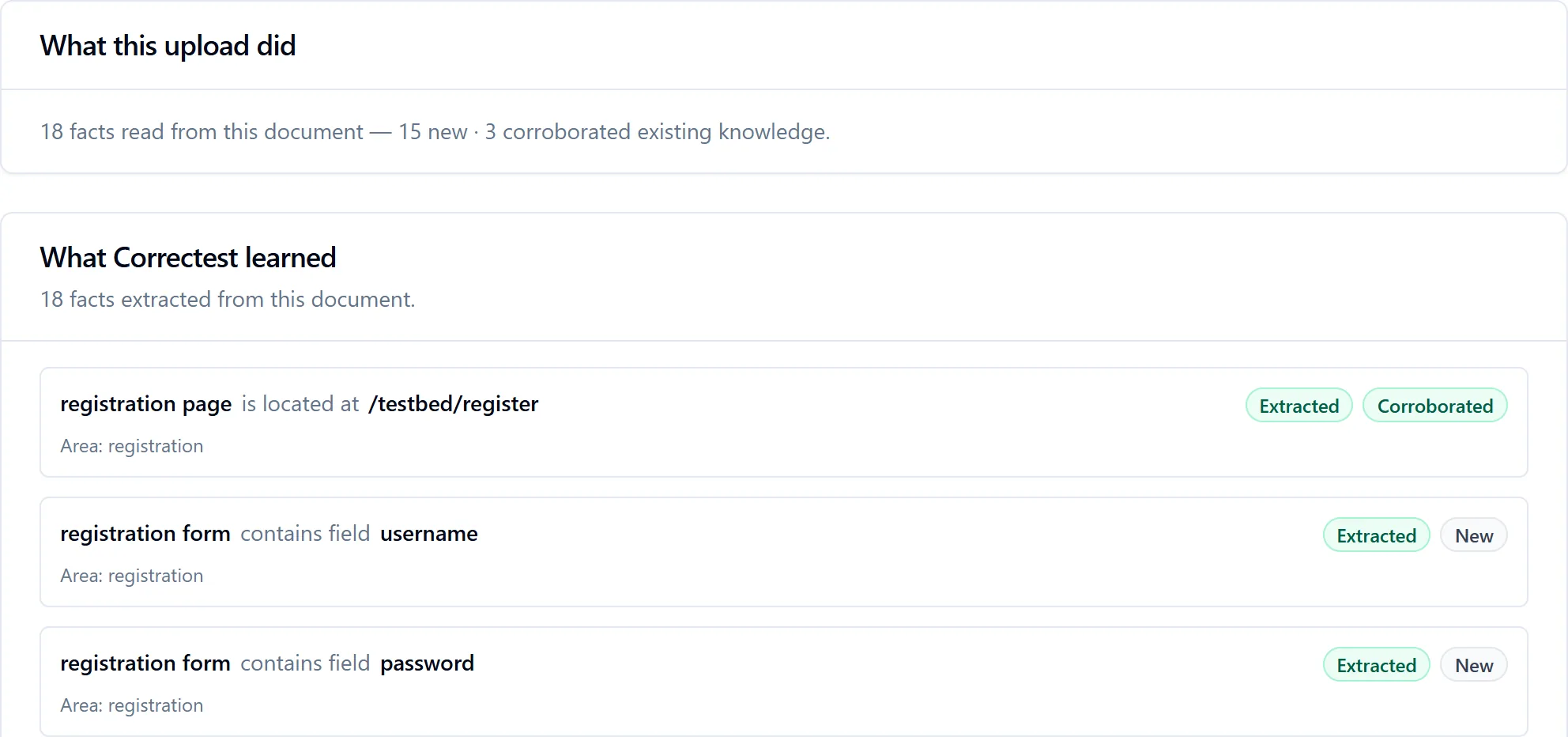
Ingestion runs in the background; the document page shows "Correctest is reading this document…" and refreshes itself until it's done, or says honestly that it failed. Then it shows what the upload did: how many facts were read, how many were new, how many corroborated existing knowledge, how many corrections were applied and what changed, how many landed ambiguously, and, the headline, which facts clearly conflict with other documents.
Conflicts and corrections
When documents disagree, nothing is decided for you, and nothing is deleted.
- An updated version
- Tick "this is an updated version of a document I already uploaded" and pick the old one. That declaration is what authorises automatic correction: the new version's facts retire the named document's contradicted facts, and only that document's, with full history kept.
- A disagreement with any other document
- Both facts stay active, plainly labelled with which document said what, until you pick one of three resolutions: it's a correction (keep the newest), keep both (the documents genuinely differ), or pick one. All three keep the full history, so Correctest can still reconstruct exactly what it knew at any earlier point. Correctest never silently overwrites established knowledge because an unrelated newer file happened to disagree, and never supersedes anything on uncertainty.
- Knowledge decisions
- Deferring is fine; nothing blocks while a conflict is open. Unresolved conflicts live on the app's Knowledge decisions view as their own review queue, the one place for decisions that need your call. Scans and ingestion never wait on a resolution.
- Scanning while a conflict is open
- Two documents disagree and Correctest is about to go and look at the app: which version should it expect? It never picks a side. For each open conflict you choose, for this scan only, to follow one document's value (provisionally; the conflict stays open) or to leave it, the default, in which case the crawl records what the app actually does for that subject and attaches it to the conflict as neutral evidence: "your documents disagree (A / B); the app was observed to do X." If the app matches neither, that's shown too. A dead spot becomes a resolution aid.
- When a conflict resolves
- A conflict never just quietly disappears. A later scan that observes the app matching a document, or a new document version that supersedes one side, raises a "Resolved — acknowledge to clear" notice. You acknowledge; only then does it clear. If a still-later scan contradicts the claim again, the flag re-opens. No conflict, document-versus-document or document-versus-app, ever closes without you seeing it.
Story-driven scanning
Your stories drive the scan. The verdict is only ever match or divergence. The decision is yours.
Upload a story document on the stories channel, a Gherkin feature, a prose user story, a Jira export, run a scan, and Correctest does five things in order.
Reads the stories into journeys.
Ordered, named, persona-scoped paths in the author's own words, each pointing back at its exact document section. This costs AI once per document; repeat scans reuse it.
Composes each journey onto the live app.
Every step's plain-English target ("the email field") is matched to a real element in the Knowledge Base; vague data is synthesised; preconditions are resolved against setup flows Correctest already knows. Where a step doesn't fit, the walk records an honest coverage finding rather than inventing a defect or skipping silently.
Executes and compares.
The journey runs against the live app on its valid path, the outcome is interpreted into an observation, and the author's claimed outcome ("the account is created") is weighed against what actually happened.
Forks divergences to a human.
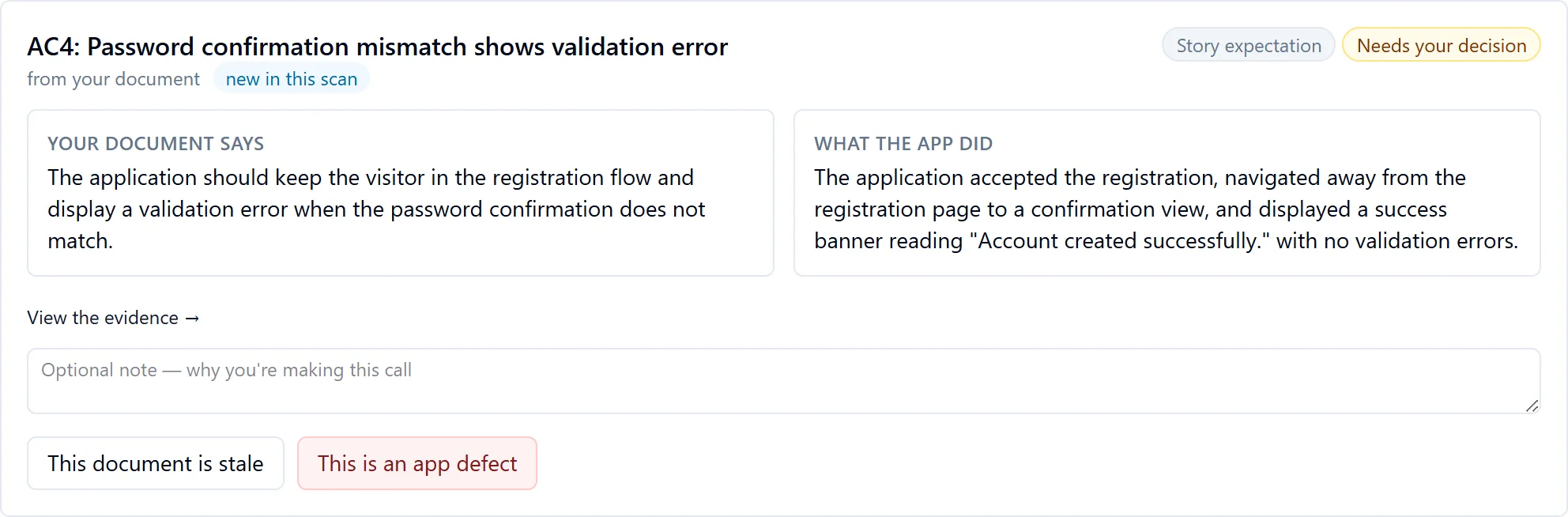
A divergence opens a dated, sourced record and you decide: the document is stale (the app is right) or the app has a defect (carried forward and re-checked on later scans; only a human confirms it resolved). History is never overwritten.
Then the crawl fills in the rest.
After the journeys, the autonomous walk covers everything the stories didn't mention: same scan, same Knowledge Base, flows distinguished only by their source.
The conformance report.
One row per acceptance criterion: story, criterion, what was observed, verdict, dated and pointing back at your own document. A "conformant" row is never invented; it is derived only when a journey executed, had a claim to compare against, and its whole compare-and-record pipeline durably completed. A story that couldn't be mapped onto the app still appears, as "not composed". An acceptance criterion is never silently missing.



Two things worth knowing about how this behaves
You decide who signs in, not the story. A story's actor is a hint Correctest shows you, never a rule it enforces, so a story written for "a new visitor" scans exactly as you would expect, and a signed-out story scan is acknowledged up front because it may never reach the pages those stories describe. And a skip stays a skip. Journey identity is stable across re-extraction, so a criterion you chose to leave out means the same thing on every later scan of that story, even when the wording of its title moves.
Preconditions
The walk establishes your "Given". It no longer assumes it.
Most acceptance criteria start with setup: "Given I am signed in as an admin", "Given a saved customer exists", "Given AC-1 has been executed". Correctest establishes the starting state first, choosing how based on what the Given actually says:
- A doable setup step ("signed in as admin", "an item is in the cart") is simply performed, in the same session, before the criterion's own steps, the way a person would prepare by hand.
- A reference to another criterion re-runs that criterion's own steps as setup, with fresh data, the same self-contained way the generated tests will work. References may chain up to two levels and may point forward; a deeper or circular chain is reported honestly.
- A described state ("a saved customer exists") is looked up in the Knowledge Base: if Correctest already knows a flow that creates that state, from this scan or earlier ones, it re-drives those steps live. What an earlier story taught, a later story's setup can use.
- Data no interface can create ("a customer who purchased two years ago") is flagged as not automatable, with standing guidance to make the story self-sufficient, because the generated tests run unattended in CI.
When setup fails, the criterion gets its own honest outcome, "couldn't establish the story's starting state", never blurred into a step failure, and never turned into a stale-doc-versus-defect question, because neither would be true.
Story-guided discovery
When you've given Correctest scanning-channel stories, the story is the map: instead of a generic crawl it walks each story's steps live and learns the app along the path the story actually takes, including the deep states a link-following crawl never sees: the checkout page that only appears after an add-to-cart sequence, the later steps of a wizard, a modal that only opens in a particular state. Where two stories cross the same page, it learns it once. Discovering the page, observing what the app did, and comparing it with your story happen in the same live walk.
Look around for gaps
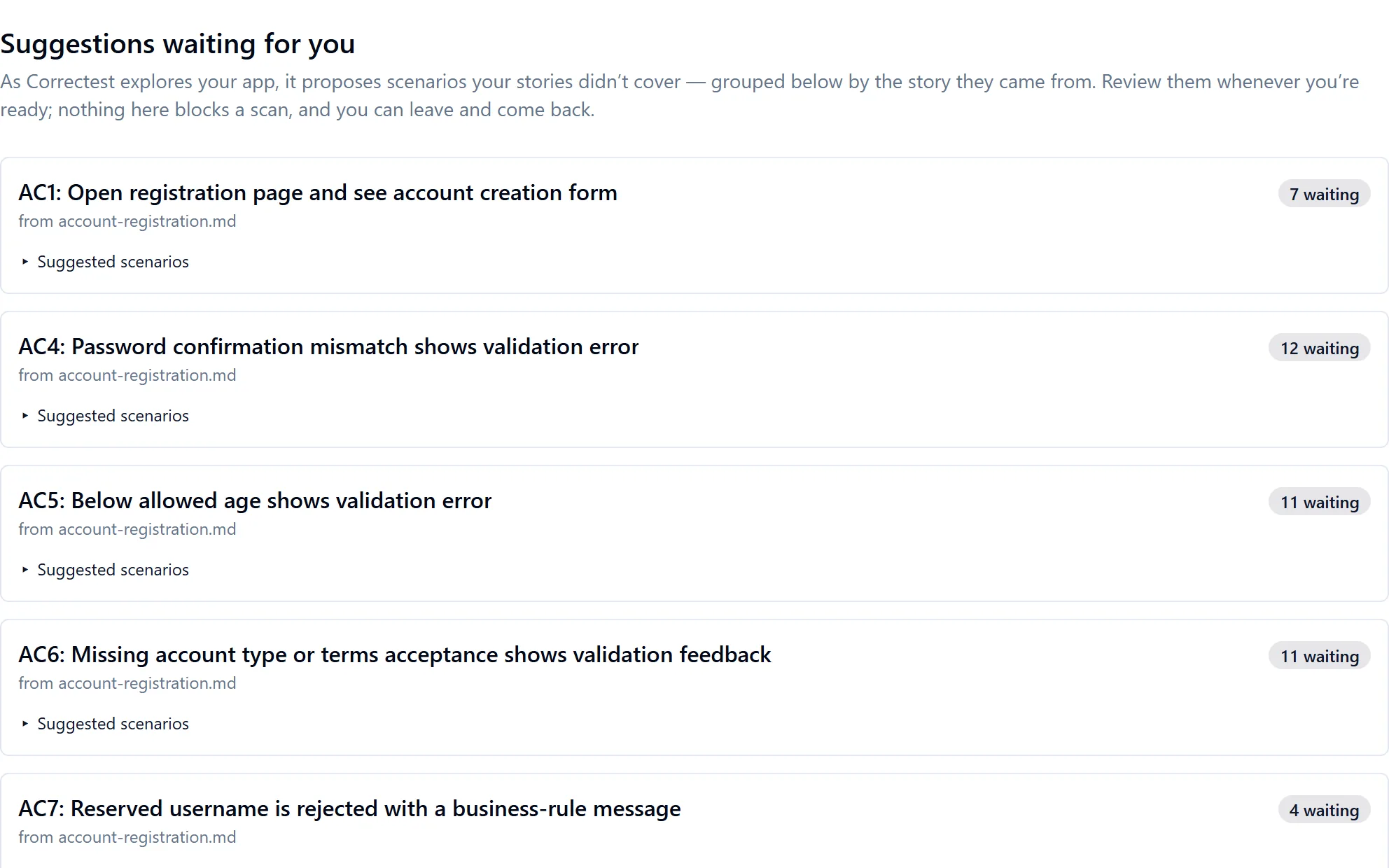
It suggests the scenarios your story didn't think of. Nothing runs without your approval.
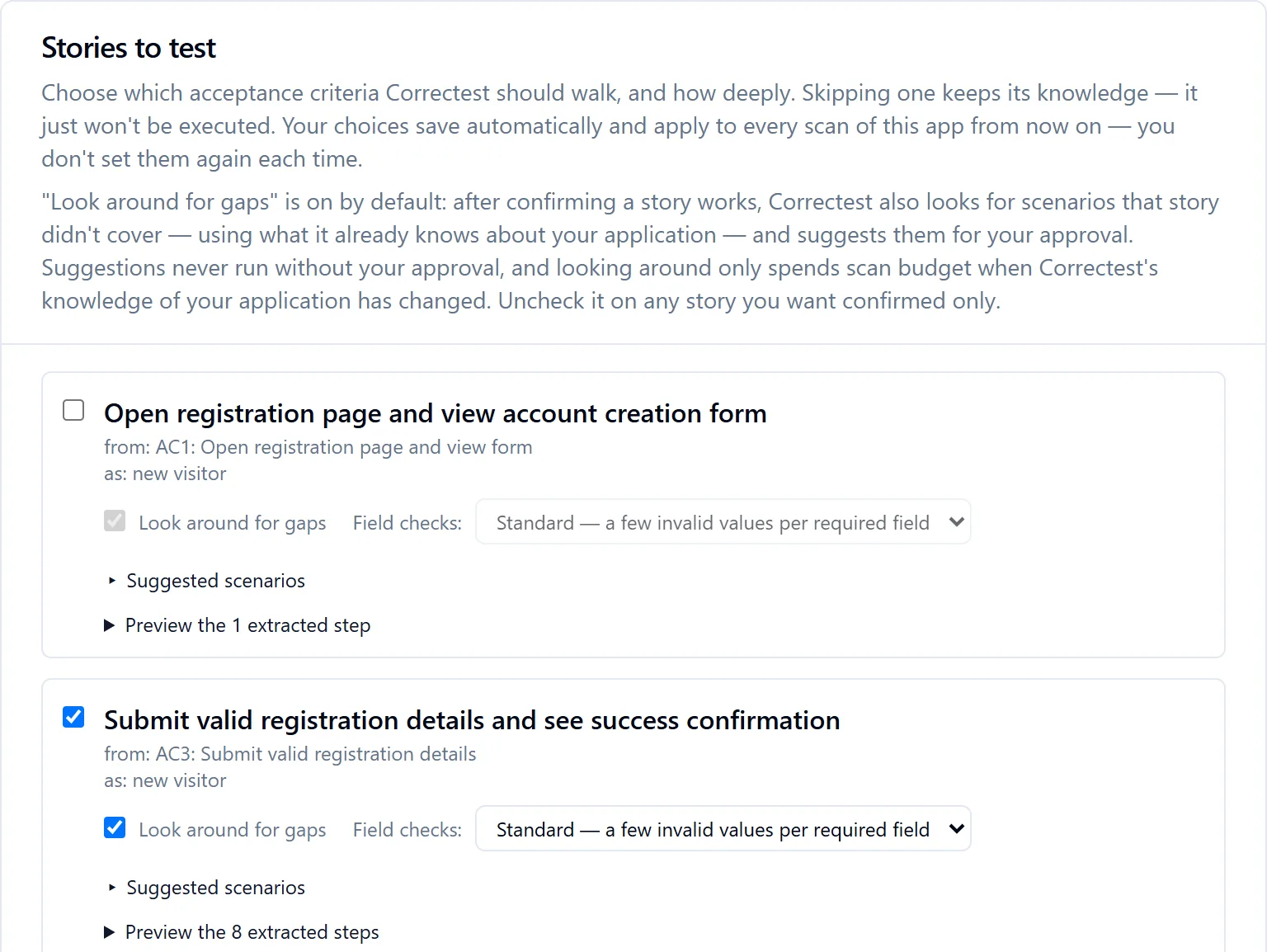
On top of confirming a story, Correctest can look around it: it cross-references the story against everything it has learned about the app, crawled option sets (a select whose three options the story exercises two of), document-stated rules, known personas, sibling stories, and the elements you yourself marked "cover this", and suggests the scenarios the story didn't cover, ranked most to least suitable, with the evidence cited on each card. It is on by default, as a visible, pre-checked "Look around for gaps" box on every story; uncheck it to keep that story confirm-only.
All grounded candidates, honestly.
Zero is a valid answer. Nothing padded. Nothing previously verdicted is re-suggested, whatever the verdict.
Yours, in your words.
Approve and define the outcome; approve observe-first ("run it and show me"); refine the text; reject with an optional why, which becomes knowledge for the next pass; or simply walk away.
Through the same pipeline.
An approved scenario is minted once as a small derived story and composed, executed, compared and reported exactly like one you wrote.
"We observed X. Is that right?"
Agree locks the observed outcome as the expected one. Disagree records a defect that blocks generation until fixed and re-observed.
Looking around spends budget only when a story is new or the app's knowledge picture genuinely changed; an unchanged picture costs zero, scan after scan. The per-scan ceiling still hard-stops all spend.
Can't automate
Not every criterion can be automated, and Correctest says so up front.
While reading your stories, Correctest judges whether a deterministic browser test can drive each acceptance criterion at all. Some can't: a status that flips ten days after a trigger, a manual back-office approval, an overnight batch job, a bank settlement, a physical delivery. This is a capability statement, never a prediction that the app will fail: a criterion is flagged only when the document itself states a structural blocker, and the verbatim sentence is quoted as the evidence.
In the story-selection view these criteria carry a plain-English "Can't automate" badge and their run checkbox is unchecked and disabled, so the scan never spends anything reaching a foregone conclusion. In the conformance report they show as capability-excluded, cleanly out of scope, never a failure.
What your manual testers get
Skipping the run never drops the surfacing. The generated project ships a written manual-test procedure for each such criterion, so "we can't automate this" becomes a deliverable your QA runs by hand, grounded in your own story's name, section and claimed outcome. The same export covers a barrier the scanner hits rather than one the document states: a sealed component the browser makes impossible to look inside.
Where the human work goes
For a manual QA team the split is deliberate. Correctest does the part that is tedious and exact: field-by-field probing with invalid values, the recording of what the app answered, the before-and-after screenshots, the comparison against your written criteria. The parts that need a person, an approval, a delivery, a judgement about whether a divergence is a defect or a stale document, are handed back as written procedures and explicit decisions, not lost in a coverage number.
When a step needs a real file
Correctest asks. It will not invent one.
"The customer attaches the receipt", "upload a photo of your ID". A made-up file is usually accepted by the browser even when the real application would reject it, so the scan would faithfully record "submitting this form produces an error" as the app's behaviour, and that wrong fact would become an assertion in your own suite. A missing capability is a known gap; a wrong test you trust corrupts the promise.
- The first scan stops honestly at the upload control: "found, but this scan can't drive that control type." It never says the control is missing.
- The report asks for the file, naming the file types the control itself declares, read from the app during the scan, or saying honestly that it declares none.
- You supply it once. It is bound to that criterion and that application, stored in your application's own vault, and deleted when the application or the account is.
- The next scan drives it for real, and the step becomes a tested step.
- The generated suite carries the file with it, copied into the project, so your CI uploads the same real file with no dependency on Correctest at run time.
Because your file ends up in your repository, you are told so at the moment you upload it, again beside the file in the project, and in the operating agreement. Inside the project the file is named after its contents, never the name you gave it. Today's boundary: one file per upload step.
Coverage gaps and differences
Two signals the scan surfaces beyond the per-criterion verdicts. A coverage gap (story > app) is a story step whose target the scanned page doesn't have. A coverage difference (app > story) is an interactive field on a story-visited page that none of your stories cover, measured against your whole active story corpus, not just the stories in this scan. When a later scan's stories cover a flagged field, the difference resolves itself; a decision you already made is never overwritten.
The story plan
Choose what runs, and how deeply. Your choices are remembered.
On a story document you pick which acceptance criteria Correctest should walk and, per story, two dials: test depth ("just confirm it works" or "confirm, then look around for gaps") and field checks ("standard" or "exhaustive" invalid-value probing of the story's own forms). Skipping a criterion keeps its knowledge; it just isn't executed. The choices save automatically and apply to every future scan of the app.
The New scan screen echoes the effective plan read-only at the moment it takes effect: how many criteria are skipped, how many run at a non-default depth, how many can't be automated and won't be walked, everything else at the default, with links to edit.
A scan without stories is a choice, not a default
When an app has no story documents yet, New scan shows a consent gate: without stories the scan explores on its own and has to guess which journeys matter. It links to adding documents first and requires an explicit "I understand — run this scan without story documents" before Start scan enables. A story-less scan remains fully supported; you simply choose it knowingly.
Two dials on every scan
- Max pages: how broadly to crawl, optional.
- Replay depth: how thoroughly to probe forms with invalid inputs: light, standard or extensive, preselected to standard. What each does →
No screen anywhere asks you for a spend cap in dollars, and none shows one. Your allowance is credits, and every scan is metered against a share of it.